Multifactor Authentication Short Training Videos Now Available
To assist users with various aspects of the multifactor authentication (MFA) process, short training videos accompanying the learning aids are now available on the PACER website.
- Multifactor Authentication (MFA) – Authentication Applications: Provides step-by-step instructions on how to add an authentication application when enrolling in MFA.
- Multifactor Authentication (MFA) – Backup Codes: Provides step-by-step instructions on how to generate backup codes when enrolling in MFA.
- Multifactor Authentication (MFA) – Logging In: Includes videos demonstrating how to log in using an authentication application and backup codes once enrolled in MFA and what to do if you do not have access to your MFA method(s).
PACER Quarterly Announcements |January 2026
Read the PACER announcements from January 2026. These updates include:
- Now Available for PAA Accounts: MFA and CM/ECF Privileges Statuses for PAA Sub-Accounts
- REMINDER: New PACER Password Standards
- and more
PACER Quarterly Announcements |October 2025
Read the PACER announcements from October 2025. These updates include:
- Now Available: Release Notes Page for PACER-enabling Applications
- Multi-factor Authentication (MFA) Update
- and more
MFA Tips and Resources
Tips
Here are a few tips to help you through the MFA enforcement and enrollment process:
- Prior to enrolling in MFA, you should confirm that the email address associated with your PACER account is correct and accessible. You can check and update your email address in Manage My Account under the Settings tab.
- You will receive a pop-up notification of the requirement to enroll in MFA when you log in to PACER (see screenshot below). You will not be sent an email regarding this requirement.

- If you use a shared PACER account, it is recommended that you confirm with your colleagues whether the account is used for filing or accessing Notices of Electronic Filing /Notices of Docket Activity. If it is used for one or both of those purposes, it might be helpful to decide how enrolling in MFA will be completed for that account. You will have three opportunities to skip the MFA enrollment process; after the three skips have been used, you will see the User Update Required account access restricted prompt and must set up MFA before proceeding (see screenshot below).

- You may use desktop, web, or browser-based authentication applications (apps) or tools (e.g., web apps, browser extensions, and desktop apps) that support time-based one-time passcode.
- When logging in, you need to open the authentication app on your device or in your web browser and use the one-time passcode displayed there (see screenshot below and page 2, step 4 of the Multifactor Authentication – Logging In learning aid). You are not sent the one-time passcode by text or push notification. Please note that in many authentication apps the one-time passcode is refreshed every 30 seconds.

- If you use all your backup codes, log in to Manage My Account. When you are presented with the One-Time Passcode prompt, click on the “Click here if you need a one-time passcode” link located at the bottom of the prompt (see screenshot). At that time, you will be presented with one of your security questions. If you respond correctly, a one-time passcode will be sent to the primary email associated with your PACER account, which will allow you to log in to Manage My Account. You can then generate new backup codes or add an authentication app. (Added February 2026)

- MFA issues may occur because time-based one-time passcodes rely on synchronized clocks. Ensure your device's time is accurate and synced. Failure to do so can lead to “invalid code errors.” Refer to your service provider or device manufacturer on how to sync your time. (Added February 2026)
- A shared PACER account can have up to ten authentication apps enrolled. When you log in to the shared account, you will need to open your authentication app on your device or your browser and enter the code displayed in that app. You are not sent the one-time passcode by text or push notification. To keep track of the various apps added to a shared account, you may want to use app nicknames that include the names of the people sharing the account and the apps they are using (e.g., John-DUO, JaneJ-Microsoft, JSmith-Google, JJones-Authy, JaneS-FreeOTP ). For instructions, see page 2, step 7 of the Multifactor Authentication – Authentication Applications learning aid.
Resources
- Learning aids:
- Multifactor Authentication (MFA) – Authentication Applications: describes the MFA enrollment process by adding an authentication application (app), as well as how to delete an authentication app
- Multifactor Authentication (MFA) – Backup Codes: describes the MFA enrollment process by getting backup codes, as well as how to delete backup codes
- Multifactor Authentication (MFA) – Logging In: describes the login process after enrolling in MFA, and what to do if you do not have access to your MFA method(s)
- Updated documentation:
- PACER QA environment: To ensure scripts work, you can test them in the QA environment at https://qa-pacer.uscourts.gov/. You must have a PACER account to use QA. To register for a PACER test account, visit https://qa-pacer.psc.uscourts.gov/pscof/registration.jsf. There is no charge for QA searches, so you may skip the credit card portion of the registration. Your QA account will be activated overnight.
Please continue to check the PACER website for more updates and additional information on MFA.
If you have any questions, please contact the PACER Service Center at pacer@psc.uscourts.gov or (800) 676-6856. The PACER Service Center hours of operation are Monday through Friday, 7 a.m. to 6 p.m. CT.
Originally published on August 22, 2025.
Informational Sessions: Multifactor Authentication & Password Standards
The Administrative Office of the U.S. Courts will host two virtual informational sessions later this month, on Thursday, July 24, 2025, at 2:30 PM ET, and Monday, July 28, 2025, at 9:30 AM ET. The sessions will cover the upcoming enforcement of the multifactor authentication requirement and updated password standards. Time will be allowed at the end of both sessions for Q&A.
To attend, you must complete this RSVP form by Monday, July 21, 2025. A link to the session will be emailed to you a couple of days prior to your selected session.
PACER Quarterly Announcements |July 2025
Read the PACER announcements from July 2025. These updates include:
- Coming Soon: New Password Standards
- Multi-factor Authentication (MFA) Now Available
- and more
Additional Security Enhancements Coming Soon
As part of an ongoing effort to secure the PACER service and CM/ECF systems, the Administrative Office of the U.S. Courts (AO) will begin enforcing updated PACER and CM/ECF password standards in August. Strong passwords are essential in safeguarding systems from unauthorized access. The new password must:
- Be 14-45 characters in length.
- Contain at least one lowercase letter, one uppercase letter, and one special character.
- Not contain any part of your first name, last name, username, or email address.
Passwords must also be updated every 180 days. This will help reduce the risk of extended use of compromised passwords.
The updated password standards will be enforced on all existing PACER-only (search/view only) accounts, including PACER Administrative Accounts (PAAs), on August 25, 2025. Users should consider updating their password as soon as possible. On August 25, PACER-only users will be prompted to update their password if they have not updated it as of May 11. Users will be prompted to update their password upon login and can skip the process three times before their account is disabled.
To align with the upcoming enforcement of the multifactor authentication (MFA) requirements, users with filing and other CM/ECF-level access who have not voluntarily enrolled in MFA by August 11 will be randomly selected to enroll in MFA and be required to update their password starting on that date. However, these users can update their password at any time.
NOTE: If you update your password before enrolling in MFA, you will NOT be required to update it again when you are prompted to enroll in MFA. If using third-party software for filing, check that updating your password does not require additional action on your part to avoid issues with the software.
If you have any questions, please contact the PACER Service Center at pacer@psc.uscourts.gov or (800) 676-6856. The PACER Service Center hours of operation are Monday through Friday 8 a.m. to 6 p.m. CT.
PACER Quarterly Announcements |April 2025
Read the PACER announcements from April 2025. These updates include:
- New Security Feature in PACER Case Locator Bankruptcy Page
- Coming Soon: Multifactor Authentication
- and more
Multifactor Authentication Coming Soon
On May 11, the Administrative Office of the U.S. Courts (AO) will begin implementing multifactor authentication (MFA) to enhance system security for CM/ECF and PACER. MFA provides an added layer of security to accounts by helping protect against cyberattacks that steal passwords, significantly reducing the risk of unauthorized access.
Once implemented, all CM/ECF and PACER users will be able to enroll in MFA. Users with filing and all other types of CM/ECF-level access will be required to enroll in MFA, while users with PACER-only access will have the option to enroll.
Implementation Details
Users with CM/ECF-level access who do not voluntarily enroll will be randomly selected to do so beginning in August. By the end of 2025, everyone with CM/ECF-level access will be required to use MFA when logging in.
NOTE: If using third-party software for filing, users should ensure MFA is supported by that software before enrolling to avoid any disruption in their business processes.
Authentication Options
Users can download any authentication application (app) that supports a time-based one-time password (TOTP). The AO does not endorse specific apps, however, some options include Authy, DUO Mobile, FreeOTP, Google Authenticator, and Microsoft Authenticator. Before enrolling in MFA, the AO recommends that users research available authentication apps to decide which one will work best for them and then download their preferred app.
Additionally, users who are unable to download an authentication app will be able to save one-time use backup codes. Once users have used all their backup codes, they will need to request a new batch.
Shared Accounts
Filers and other users with CM/ECF-level access who share their account will be able to add up to five authentication apps. In other words, they can enroll up to four other users’ authentication apps in addition to their own.
Please continue to check the PACER website for more updates and additional information on MFA.
Resources
- Updated documentation:
- PACER QA environment: To ensure scripts work, users can test them in the QA environment at https://qa-pacer.uscourts.gov/. You must have a PACER account to use QA. To register for a PACER test account, visit https://qa-pacer.psc.uscourts.gov/pscof/registration.jsf. There is no charge for QA searches, so you may skip the credit card portion of the registration. Your QA account will be activated overnight.
- Learning aids:
- Multifactor Authentication (MFA) – Authentication Applications: describes the MFA enrollment process by adding an authentication application (app), as well as how to delete an authentication app.
- Multifactor Authentication (MFA) – Backup Codes: describes the MFA enrollment process by getting backup codes, as well as how to delete backup codes.
- Multifactor Authentication (MFA) – Logging In: describes the login process after enrolling in MFA, and what to do if you do not have access to your MFA method(s).
If you have any questions, please contact the PACER Service Center at pacer@psc.uscourts.gov or (800) 676-6856. The PACER Service Center hours of operation are Monday through Friday 8 a.m. to 6 p.m. CT.
Originally published on April 4, 2025.
Coming Soon: Changes to PCL’s Find Bankruptcy by SSN/EIN Page
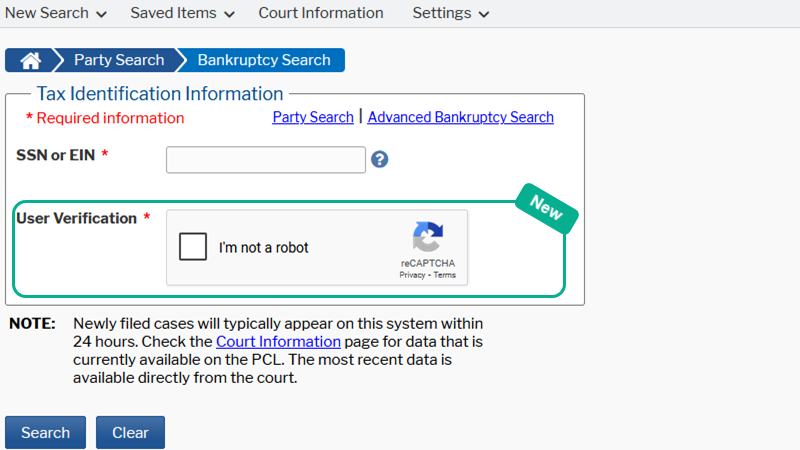
Starting Apr. 13, 2025, users can once again search for bankruptcy records using only the SSN/EIN on the PACER Case Locator (PCL) Bankruptcy Search page. However, this page will require responding to a CAPTCHA challenge to proceed.
Note: There are no current plans to update the PCL API. API users will still need to provide a last name or business name when searching by SSN/EIN.
To prepare now, you can test your scripts in the QA environment at https://qa-pcl.uscourts.gov/pcl/pages/search/findBankruptcy.jsf.